
SCCM SQL Based Replication Guide ConfigMgr Endpoint Manager. The New (SQL) based site-to-site replication model is the most challenging but very interesting part (at least for me) of System Center Configuration Manager.
So, I thought of sharing some points which are the main pillars of the SQL replication model. Also, you can find very useful blog posts about SQL-based replication from Microsoft in the resources section of the post. This SCCM SQL Based Replication Guide gives you end-to-end coverage of issues.
Before going into deep dive, I would like to thank Saud Al-Mishari, Microsoft PFE (when this post was published ) who was the speaker of the MMS 2012 session “CD-B407”. This post is inspired by his session.
Also, I will share some tips such as how to force or re-init site to site replication, and verify the site to site replication……

Latest Post – FIX SCCM SQL Replication Issues Using Replication Link Analyzer
Read More: Troubleshoot and FIX SCCM SQL Backlog Issues
SCCM SQL Based Replication Guide ConfigMgr Endpoint Manager
Let’s understand the key components of the new (SQL) based replication model.
- DRS – Data Replication Service
- SSB – SQL Service Broker
- RCM – Replication Configuration Management/Monitoring
- RG – Replication Group
- Replication Pattern
- Article Name/s
DRS – Data Replication Service / SSB – SQL Service Broker
To replicate the data between ConfigMgr sites, Configuration Manager uses Database Replication Service (DRS). The DRS intern uses SQL Server Service Broker (SSB) to replicate data between the sites.

RCM – Replication Configuration Management / Monitoring
RCM is a thread of SMSEXEC. As the name suggests, this thread keeps an eye on Replication Configuration and Monitoring. You can refer to the rcmctrl.log file to get more details about RCM related activities.
RG – Replication Group
Replication Groups are a set of tables that are monitored and replicated together. Replication groups are segregated and grouped into THREE Replication Patterns.
To get the full list of RG along with the replication schedule – Run the SQL query – Select * from vReplicationData
Each RG (Replication Group) has a unique Replication ID. In CM 2012 (and CB version) RTM release, all the transport is based on DRS.
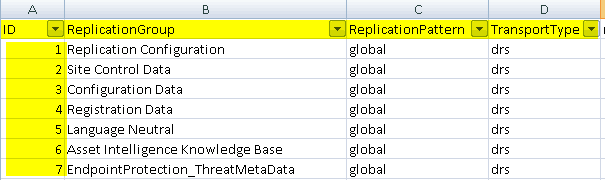
Replication Pattern
Replication Patterns are group rules based on those, the replication groups are segregated. Three replication patterns are available. More Details about Data Replication – TechNet Blog
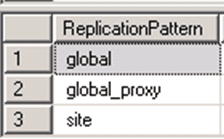
a) Global – Global data is anything that is created by the administrator. Two-way replication between the CAS and Primaries. e.g Package Metadata
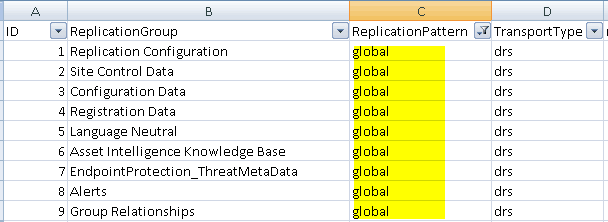
b) Global_Proxy – This Replication data is based on secondary servers.

c) Site – One-way replication to the parent site / CAS. e.g Software Inventory/Hardware Inventory
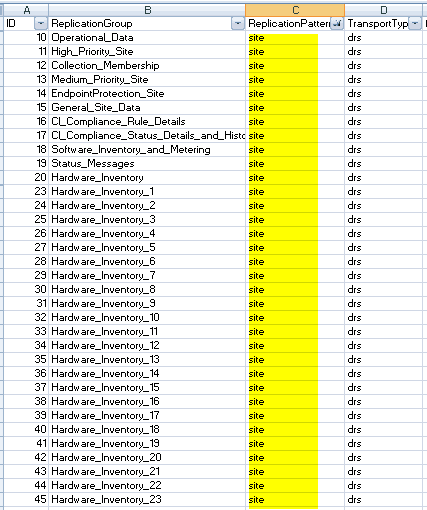
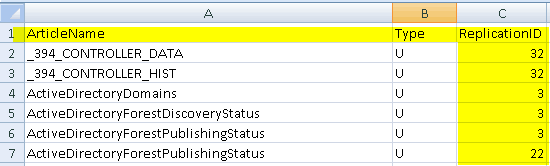
List of SCCM Database Article Name/s
Replication Groups are further divided into Article Names based on ReplicationID. Each RG (Replication Group) has a unique Replication ID.
Run the SQL query to get the list of Article Names used for the SCCM database.
Select * from vArticleDatae.g Add_Remove_Programs_64_DATA, Add_Remove_Programs_64_HIST, Add_Remove_Programs_DATA, BoundaryGroup, BoundaryGroupMembers etc…
Force SCCM Database Site To Site Replication / re-init process
You can use <site_Code>.SHA file or Preinst.exe /syncchild, If you want to force the site to site replication in SCCM / ConfigMgr 2007. Fortunately/unfortunately, these methods are NOT going to work in CM 2012 
/SYNCCHILD option to sync child sites has been deprecated. This functionality is
no longer required in System Center 2012 Configuration Manager.

If you need to perform a manual sync between the CAS and Primary server, same as dropping.SHA file in the inbox or sync child…..
You can use the stored procedure (sproc) spDrsSendSubscriptionInvalid with a suitable parameters to force the site to site replication.
Word of caution – This will start the re-replication between the sites and may cause of a lot of Network Traffic…..
EXEC spDrsSendSubscriptionInvalid,,
EXEC spDrsSendSubscriptionInvalid 'PR1', 'CAS', 'Configuration Data'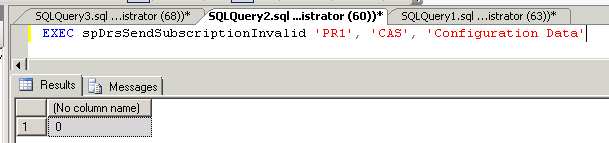
How to verify the site-to-site replication from SQL Server Management studio?
Run the SQL query to check out Transmission Queue for a particular site (in my example it’s site PR1). The SQL query (Transmission Queue) is available in Add files via upload · AnoopCNair/SCCM-SQL-backlog-Check-Query@010e8f9 (github.com)
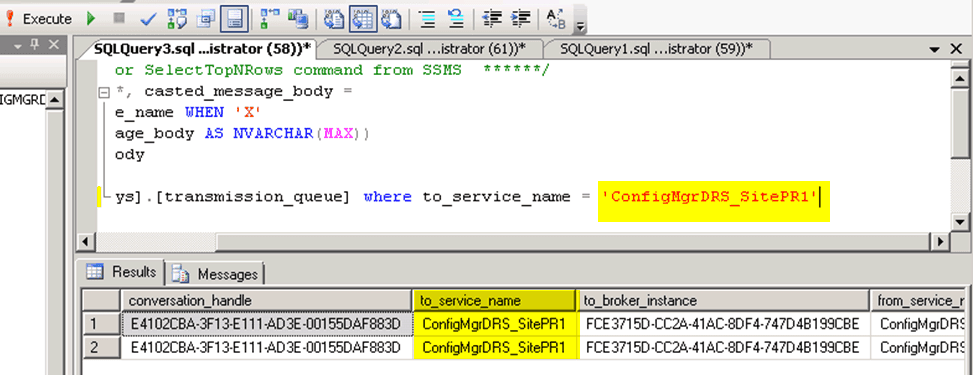
You can verify the transmission logs through the vLogs view.
Word of Caution – Avoid using the “ select * from vLogs ” query in the production environment !!
select * from vLogs
Select top 1000 * from vLogs order by LogTime desc
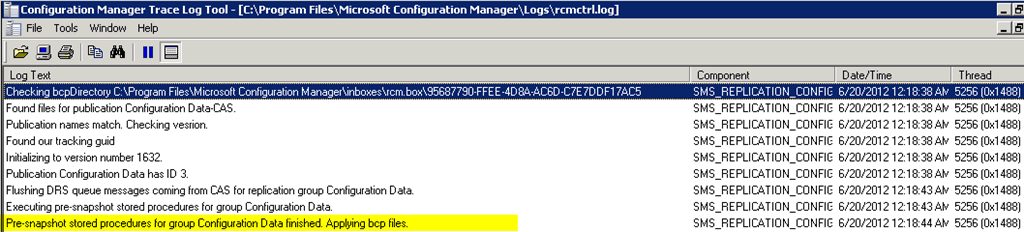
You can verify site replication through the rcmctrl.log at CAS and Primary servers.
rcmctrl.log @ CAS server.
See the log file entry “Created miniJob to send a compressed copy of DRS INIT BCP Package to site PR1.”
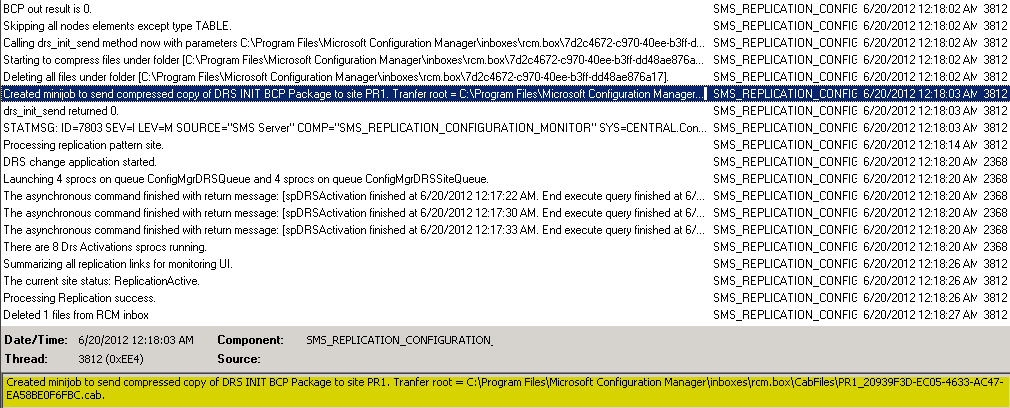
rcmctrl.log @ Primary server (PR1)
SQL Queries to Troubleshoot SCCM Database Replication
Some Random SQL Queries will help to troubleshoot further on this type of issue. Make sure you have proper SQL backup before updating the SQL DB.

select * from RCM_ReplicationLinkStatus where SnapshotApplied <>1

Select * from Sites where SiteCode in ('CAS','H00')

Update ServerData set SiteStatus = 125 where SiteCode = 'CAS'

Exec spFakeSiteOutOfMaintenance 'CAS'

Select * from rcm_drsinitializationtracking where initializationstatus not in (6,7) order by initializationstatus desc

Exec SpDiagDRS

Update RCM_DrsInitializationTracking set InitializationStatus = 6 where SiteRequesting='H00' and SiteFulfilling='CAS'

Update Sites set Status =1 and DetailedStatus =125 where sitecode = 'CTO'

EXEC spDrsSendSubscriptionInvalid 'H00', 'CAS', 'Replication Configuration'
More Details about DRS – TechNet Article
More Details about SSB – SQL Team Article
Microsoft ConfigMgr Team released another extensive guide for SCCM ConfigMgr – SQL based related troubleshooting – here
Sudheesh SQL Troubleshooting Guide – here
Author
Anoop C Nair is Microsoft MVP! He is a Device Management Admin with more than 20 years of experience (calculation done in 2021) in IT. He is Blogger, Speaker, and Local User Group HTMD Community leader. His main focus is on Device Management technologies like SCCM 2012, Current Branch, and Intune. He writes about ConfigMgr, Windows 11, Windows 10, Azure AD, Microsoft Intune, Windows 365, AVD, etc.
Looks as if the content was just taken from Saud Al-Mishari sessions on MMS and TechEd. Too bad that you did not mention that.
Hello noname – You’ve missed it mate (whoever you may)… And if you dont have time to read the full post then it’s better NOT to read…. Half information is very dangerous……I think, you didn’t read the FULL post 🙂 It’s not very good thing to hide the identity….
Very Useful..thank you.
Anoop,
In trying to fix a replication problem, I executed EXEC spDrsSendSubscriptionInvalid , , on our CAS and Primary:
http://blogs.msdn.com/b/minfangl/archive/2012/05/16/tips-for-troubleshooting-sc-2012-configuration-manager-data-replication-service-drs.aspx
At this point, I’m showing that the replication link has failed – The two replication groups that are failing are “Configuration Data” and “CI_Compliance_Rules_Details”, which were the two replication groups that I expired with the above command.
Do you have any ideas what is going on at this point?
Good Post!…………Thankyou!
EXEC spDrsSendSubscriptionInvalid ‘PR1′, ‘CAS’, ‘Configuration Data’
When I run it, the replicationgroup degraded. How to fix it?Thanks!
My trouble like Brian Walker write. And now, I do not know what to do and how it fix….
Hi
I am facing an SCCM DRS issue in production environment . I was hoping if anyone can provide me an insight on how to troubleshoot it . we have 1 sccm cas & 1 sccm primary in hierarchy, Recently we did SQL databases migration for both , from an dedicated SQL server to CAS & Primary server respectively . Since then the sccms are in read only mode . database replication link between them have failed , upon restarting the SSB queues in SQL & reinitializing the replication for failed replication groups (global data) database replication link in cas became active for couple of hours but then again failed during this time child to parent link status in primary for still displaying failed .
Additional details :
Out of 34/54 (global data) replication groups in SQL 3 have failed , around 10 are degraded rest are active but showing an earlier date when sql was not migrated .
Thanks
CAS is in maintenance mode or Primary? Both have different approaches. Please let me know.
both CAS & Primary are in read only mode
Is it readonly mode or maintenance mode?
Have you tried Replication link analyser? If so, what is the result you’re getting ?
RCM inbox folder is having backlog ?
Also, check the status of the site using following query … Select * from Sites where SiteCode in (‘CAS’,’PRI’)
Hi Anoop, Thanks for sharing this, detailed and well explained.
Hi Anoop
Super article. I have an issue for database replicating from Primary to CAS in a single primary and CAS scenario for both global and site data. From CAS to primary replication is working fine.
When checked the vlogs the description for all replication group is “Not sending changes to sites CAS, since last 2 syncs to these sites have not completed” Kindly help me since iam troubleshooting this issue for long days
Very Nicely explained
We have CAS and 5 primary site setup.there is no issue with 4 primary sites to CAS replication issue.but 1 primary which is managing more than 80000 clients having replication issue with CAS. it is looking fine in weekend but in weekdays is almost showing failed status. Prompt reply will be appreciated.
Can you please let me know what are the troubleshooting steps you performed ?
Hello Anoop
How can I identify whether database is in maintainence mode..
Hello I have seen this issue https://www.anoopcnair.com/error-the-database-is-in-single-user-mode-and-a-user-is-currently-connected-to-it/ is this similar ?