
How to Edit SCCM Site Control sitectrl File ConfigMgr Endpoint Manager. Disclaimer – Editing/Updating DataBase or Site Control (sitectrl) file is NOT supported.
We all know that ConfigMgr 2012 doesn’t store the Site Control ( sitectrl ) file in the file system. However, it’s stored in the SQL database (as an XML file).
Latest Post – Enable Windows 10 Servicing Using SCCM | ConfigMgr | WSUS HTMD Blog (anoopcnair.com)
Following are the 4 topics that I would like to cover in this post. Only applicable to SCCM / ConfigMgr 2012 and current branch.

1. How to view the site control ( sitectrl ) file?
2. How to Edit or Update the Site Control ( sitectrl ) file?
3. How to change the site description ( SiteName )?
4. Verification – ConfigMgr 2012 console and WMI class “SMS_SCI_SiteDefinition”.

How to Edit SCCM Site Control sitectrl File ConfigMgr Endpoint Manager
How to view the site control ( sitectrl ) file?
You can run the following query to VIEW the Site Control ( sitectrl ) file from the Data Base.
Note – Replace “SITECODE” with YOUR 3 digit site code.
SELECT SiteControl FROM vSMS_SC_SiteControlXML WHERE SiteCode = ‘SITECODE’
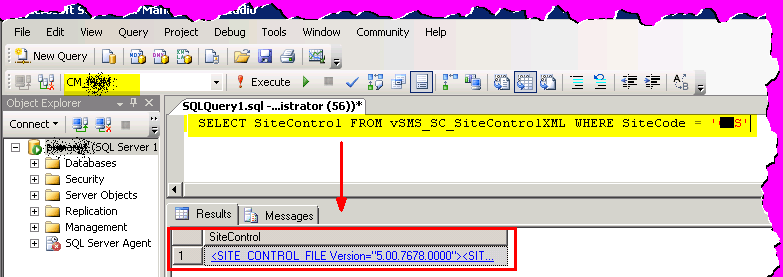
Click on the link which appears in the result pane of the query windows. That will open up the Site Control ( sitectrl ) XML file.
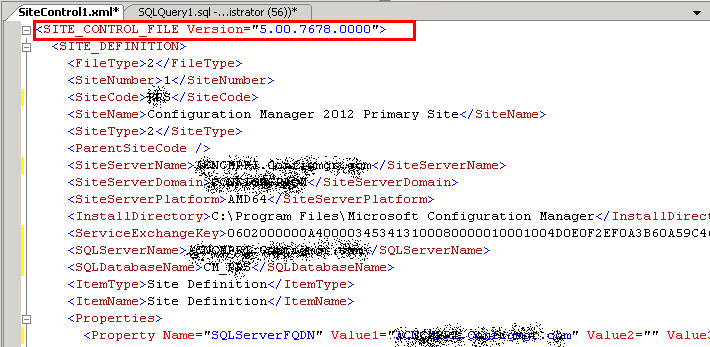
How to Edit or Update the Site Control ( sitectrl ) file?
Most of us know, we can’t directly edit this XML file from the Data Base (just like, we used to do with notepad in SCCM 2007).
I had failed to update the XML file even with the following SQL command. Later, I came to know that this method would ONLY work if the object was a table or updateable view. In my case (I *think*), this is neither a table nor a updateable view.
Incorrect Method
DECLARE @newValue varchar(50)
SELECT @newValue = ‘SCCM 2012’
UPDATE vSMS_SC_SiteControlXML SET SiteControl.modify
(‘replace value of (/SITE_CONTROL_FILE Version=”5.00.7678.0000″/SITE_DEFINITION/SiteName/text())[1] with sql:variable(“@newValue”)’)
Error
Msg 4406, Level 16, State 1, Line 1
Update or insert of view or function ‘vSMS_SC_SiteControlXML’ failed because it contains a derived or constant field.
So, in order to edit the sitectrl file, I need to find out the views and tables which are related to the View vSMS_SC_SiteControlXML.
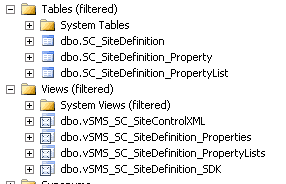
After doing some research, I’ve noticed that the following are the tables and views related to ‘vSMS_SC_SiteControlXML’ view.
Following are the tables related to site control ( sitectrl ) xml file.
dbo.SC_SiteDefinition, dbo.SC_SiteDefinition_Property and dbo.SC_SiteDefinition_PropertyList
How to change the site description ( SiteName )?
In this scenario, I wanted to change the site description (“SiteName” value from the XML file). Current site description is “Configuration Manager 2012 Primary Site” and this should be updated to “SCCM 2012”.
At last, I found that I need to update the “SiteName” value from the table called “SC_SiteDefinition” to update the site description.
Once you’ve updated the value (using the following SQL query), the Site description will automatically get updated in the site control (sitectrl) XML file.
You can verify the same by opening the sitectrl file using the query mentioned in the start of this post.
Run the following query (in “SQL studio –> New Query”) to update the Site description to “SCCM 2012”.
Note :: Change the SiteName (site description)
Update SC_SiteDefinition set SiteName = ‘SCCM 2012’ where SiteCode = ‘MCM’

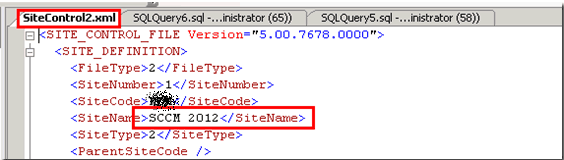
Verification – ConfigMgr 2012 console and WMI class “SMS_SCI_SiteDefinition”
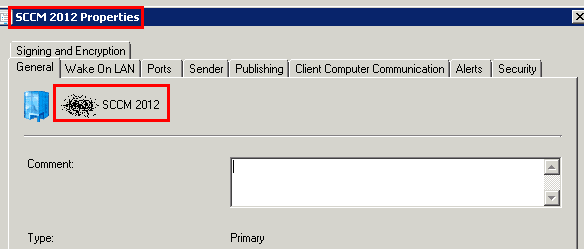
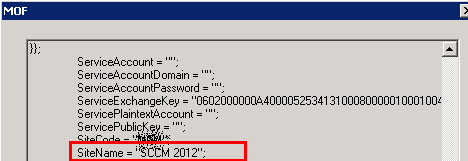
The change is also reflected in the ConfigMgr 2012 console as well as in WMI (more details – SMS_SCI_SiteDefinition ). See,
WMI Query – select * from SMS_SCI_SiteDefinition
I’m not pretty sure about any other EASY way/method to update site control (sitectrl) file. Please share if you found any other method.
Hi Anoop – You dont want to mess the things in DB directly especially for Site Control file. It would cause very interesting problems and may lead to restore of DB from backup to say the least.
Having said that you may want to WMI classes which were available for Site Control File manipulation I dont remember exactly name and location etc but you are smart enough to find them out on your own. 🙂
-JitenRK
Hi Jiten – I know (that is what I mentioned in the bottom of the post). It’s better to use a script. Please share/publish the power shell script to achieve this (if you’ve any)!!
Hi Anoop. Great article. What if I need to change the site code and not the name?
Hi ! That is also not supported. I’ve never tried this. It could have more impact as site code is used all around your hierarchy.
Great info Anoop.
Peter van der Woude has a PowerShell script to do this using WMI @ http://www.petervanderwoude.nl/post/changing-a-site-name-in-configmgr-2012-via-powershell
I’ve modified Peter’s script to affect Secondary Sites @ http://chadstech.net/sccm-2012-site-name-change
Hi Anoop,
How do I delete specific LDAP path from sitecontrol file from ‘Active Directory Security Group Component’ ..?
some background info:
On one of my SCCM 2012 R2 primary site, Component ‘SMS_AD_SECURITY_GROUP_DISCOVERY_AGENT’ is critical. When i check for error messages, I can see below error,
Active Directory Security Group Discovery Agent failed to bind to container LDAP://CN=Users,DC=Domain,DC=COM. Error: E_ADS_PROPERTY_NOT_FOUND.
Possible cause: The AD container specified earlier might be invalid now. The Domain Controller is inaccessible.
Solution: Please verify that the AD container paths specified are valid. Confirm accessibility of the site server to the Domain Controller to be queried.
Above LDAP path is no more in ‘Security Group’ discovery nor exists in AD. so how do i remove it from database?
Thanks
Failed to get top level site code any solutions
I don’t know about any supported solution. Better to raise a case with Microsoft.
Did you get you solution for it?